> ## Documentation Index
> Fetch the complete documentation index at: https://ahasend.com/docs/llms.txt
> Use this file to discover all available pages before exploring further.
# Message Routing
> Automatically process inbound emails with AhaSend message routing - route emails to your applications for support tickets, replies, and automated workflows
Message routing enables you to automatically process inbound emails sent to your domains by forwarding them to your application endpoints in real-time. When someone sends an email to addresses on your AhaSend domains, the system can automatically parse and route these messages to your applications, making it perfect for support ticket systems, reply handling, and automated email processing workflows.
**Inbound Email Processing:** Message routing handles emails sent TO your domains, while webhooks track emails sent FROM your domains. Both use similar HTTP POST mechanisms but serve different purposes.
## What is Message Routing?
Message routing is a powerful mechanism for efficiently managing and directing inbound email traffic within your applications. By setting up message routes, you can automatically parse and direct incoming emails to appropriate endpoints based on predefined rules or criteria.
This functionality enables you to:
Automatically convert inbound emails into support tickets or customer inquiries
Handle email replies and integrate them into existing conversation threads
Parse and store email content directly in your databases or CRM systems
Trigger application logic based on inbound email content and metadata
### How Message Routes Work in AhaSend
An email is sent to an address on your AhaSend domain (e.g., `support@yourdomain.com` or `ticket-*@yourdomain.com`)
AhaSend checks configured routes to find matching recipient patterns
The email is parsed, processed, and formatted according to your route settings
AhaSend sends a POST request to your endpoint URL with the email data
**MX Record Requirement:** Message routing requires your domain's MX records to point to AhaSend. Without proper MX configuration, AhaSend cannot receive emails sent to your domain.
## Prerequisites
Before setting up message routing, ensure your domain is properly configured:
**Required Configuration:**
* Domain must be added and verified in your AhaSend account
* MX records must point to AhaSend's mail servers
* DNS propagation should be complete (may take up to 48 hours)
**Verification Steps:**
1. Check your domain status in the AhaSend dashboard
2. Verify MX records are correctly configured
3. Test email delivery to ensure routing works
**Your Application Endpoint Must:**
* Accept HTTP POST requests
* Respond with 2xx status codes (200-299) for successful processing
* Handle JSON payloads up to several MB (if attachments enabled)
* Process requests within 10 seconds to avoid timeouts
**Optional Features:**
* Verify webhook signatures for security
* Implement idempotency using webhook-id headers
* Handle duplicate or retry requests gracefully
## Creating Message Routes
Configure message routes in your AhaSend dashboard to start processing inbound emails:
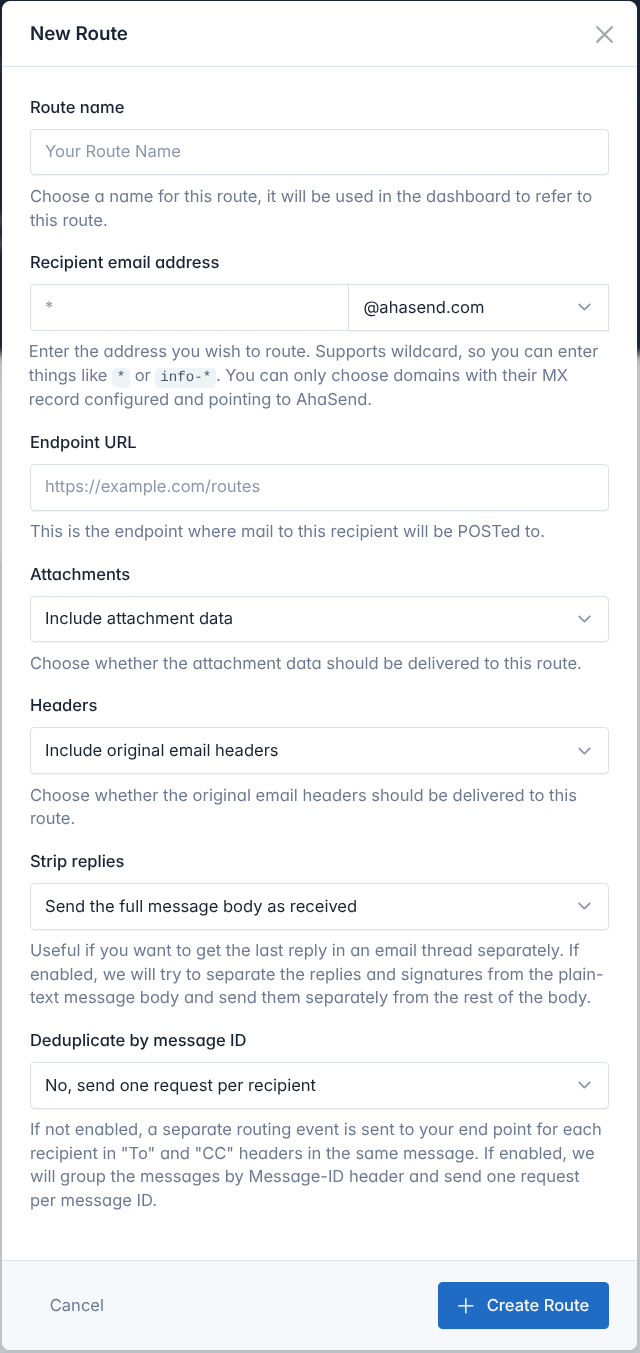 1. **Log in** to your [AhaSend Dashboard](https://dash.ahasend.com)
2. **Navigate** to the **[Routes](https://dash.ahasend.com/account/-/integrations/routes)** section from the main menu
3. **Click** the **"Add Route"** button
**Enter Your Endpoint URL:**
* Provide the complete URL where you want to receive routing events
* Must be a valid HTTPS URL (HTTP allowed for development)
* Should respond with 2xx status codes for successful processing
**Example URLs:**
```
https://api.yourapp.com/inbound-email
https://yourapp.com/api/support/tickets
```
**Configure Email Address Routing:**
Choose the email addresses to route using the recipient email address field:
**Specific Address:**
* `support` - Routes only `support@yourdomain.com`
**Wildcard Patterns:**
* `*` - Routes ALL emails to the domain
* `ticket-*` - Routes `ticket-123@yourdomain.com`, `ticket-abc@yourdomain.com`, etc.
* `*-support` - Routes `help-support@yourdomain.com`, `sales-support@yourdomain.com`, etc.
**Start Specific:** Begin with specific addresses like "support" or "info" before using broad wildcards like "\*" to avoid overwhelming your endpoint.
**Customize how emails are processed:**
**Include Attachments:**
* Enable to receive email attachments as base64-encoded data
* Significantly increases payload size
* Useful for document processing or file handling workflows
**Payload Size:** Enabling attachments can create payloads of several MB. Ensure your endpoint can handle large requests.
**Include Raw Headers:**
* Receive complete original email headers
* Useful for advanced email processing or compliance requirements
* Includes routing information, authentication results, and metadata
**Reply Extraction:**
* Automatically separate new message content from quoted replies
* Useful for conversation threading and clean content extraction
* Provides both full body and extracted reply content
**Handle Multiple Recipients:**
* **Disabled (default):** Separate request for each recipient (To, CC, BCC)
* **Enabled:** Single request per email regardless of recipient count
* Use when you want to process each email only once
1. **Click** "Create Route" to save your configuration
2. **Note the Route Secret** displayed on the details page
3. **Copy and store** the secret securely for signature verification
**Save Your Secret:** The route secret is shown only once. Store it securely in your application's configuration for webhook signature verification.
## Testing Message Routes
Verify your message routing integration works correctly:
1. **Go to** your message route details page in the dashboard
2. **Click** "Send Test Event"
3. **Verify** your endpoint receives the test payload
Test events contain realistic sample data and arrive within seconds.
**For Quick Testing:**
* Use [Beeceptor](https://beeceptor.com) to create temporary endpoint URLs
* Inspect incoming requests and verify payload structure
* Test without writing application code first
**For Development:**
* Use [ngrok](https://ngrok.com) to expose local development servers
* Test routing handling in your actual application code
**Test with Actual Email Delivery:**
1. Ensure your domain's MX records point to AhaSend
2. Send an email to your configured address pattern
3. Verify your endpoint receives the routing request
4. Check the email content and metadata are correct
**Test Email Sources:** Try sending from different email providers (Gmail, Outlook, etc.) to test various email formats and edge cases.
## Security and Verification
Message routing follows the [Standard Webhooks specification](https://github.com/standard-webhooks/standard-webhooks) for secure payload delivery:
### Security Headers
Every routing request includes the same security headers as webhooks:
```http theme={null}
webhook-id: wh_1234567890abcdef
webhook-timestamp: 1683360000
webhook-signature: v1,g0hM9SsE+OTPJTGt/tmIKtSyZlE3uFJELVlNIOLJ1OE=
```
**Unique routing identifier** - Use as an idempotency key to prevent processing duplicate routing requests from retries.
**Unix timestamp** when the routing request was sent - Use to reject old routing attempts.
**HMAC signature** of the payload using your route secret - Verify this to ensure authenticity.
### Signature Verification
Use Standard Webhooks libraries to verify routing request authenticity:
```javascript Node.js theme={null}
import { Webhook } from 'standardwebhooks';
const webhook = new Webhook(process.env.ROUTE_SECRET, { format: 'raw' });
// In your routing handler
export async function handleInboundEmail(request) {
const payload = await request.text();
const headers = {
'webhook-id': request.headers.get('webhook-id'),
'webhook-timestamp': request.headers.get('webhook-timestamp'),
'webhook-signature': request.headers.get('webhook-signature')
};
try {
const routingEvent = webhook.verify(payload, headers);
// Process verified inbound email
console.log('From:', routingEvent.data.from);
console.log('Subject:', routingEvent.data.subject);
// Create support ticket, process reply, etc.
await processInboundEmail(routingEvent.data);
return new Response('OK', { status: 200 });
} catch (error) {
return new Response('Invalid signature', { status: 400 });
}
}
```
```python Python theme={null}
from standardwebhooks.webhooks import Webhook
import os
webhook = Webhook(os.environ['ROUTE_SECRET'])
def handle_inbound_email(request):
headers = {
'webhook-id': request.headers.get('webhook-id'),
'webhook-timestamp': request.headers.get('webhook-timestamp'),
'webhook-signature': request.headers.get('webhook-signature')
}
try:
payload = request.body
routing_event = webhook.verify(payload, headers)
# Process verified inbound email
email_data = routing_event['data']
print(f"From: {email_data['from']}")
print(f"Subject: {email_data['subject']}")
# Create support ticket, process reply, etc.
process_inbound_email(email_data)
return {'status': 'success'}, 200
except Exception as e:
return {'error': 'Invalid signature'}, 400
```
```go Go theme={null}
package main
import (
"io"
"log"
"net/http"
"os"
standardwebhooks "github.com/standard-webhooks/standard-webhooks/libraries/go"
)
func handleInboundEmail(w http.ResponseWriter, r *http.Request) {
webhook, err := standardwebhooks.NewWebhookRaw(os.Getenv("ROUTE_SECRET"))
if err != nil {
http.Error(w, "Invalid route secret", 500)
return
}
payload, _ := io.ReadAll(r.Body)
headers := r.Header
if err := webhook.Verify(payload, headers); err != nil {
http.Error(w, "Invalid signature", 400)
return
}
// Process verified inbound email
log.Printf("Verified routing request received")
// Parse payload and process email
// Create support ticket, process reply, etc.
w.WriteHeader(200)
}
```
```php PHP theme={null}
getBody();
$headers = $request->getHeaders();
try {
$routingEvent = $webhook->verify($payload, $headers);
$emailData = $routingEvent['data'];
// Process verified inbound email
error_log("From: " . $emailData['from']);
error_log("Subject: " . $emailData['subject']);
// Create support ticket, process reply, etc.
processInboundEmail($emailData);
return response('OK', 200);
} catch (Exception $e) {
return response('Invalid signature', 400);
}
}
?>
```
**Standard Webhooks Compatibility:** Message routing uses the same [Standard Webhooks libraries](https://github.com/standard-webhooks/standard-webhooks) as regular webhooks, so you can use the same verification code for both.
## Message Route Payload Structure
All message routing requests follow the Standard Webhooks payload format:
```json theme={null}
{
"type": "message.routing",
"timestamp": "2024-05-07T10:41:45.026792973Z",
"data": {
// Inbound email data
}
}
```
### Complete Payload Example
```json theme={null}
{
"type": "message.routing",
"timestamp": "2024-05-07T10:41:45.026792973Z",
"data": {
"id": "route-msg-12345",
"from": "customer@gmail.com",
"reply_to": "customer@gmail.com",
"to": "support@yourdomain.com",
"subject": "Help with my account",
"message_id": "",
"size": 2048,
"spam_score": 0.1,
"bounce": false,
"cc": "",
"date": "Mon, 06 May 2024 13:15:46 +0000",
"in_reply_to": "",
"references": "",
"auto_submitted": "",
"html_body": "
1. **Log in** to your [AhaSend Dashboard](https://dash.ahasend.com)
2. **Navigate** to the **[Routes](https://dash.ahasend.com/account/-/integrations/routes)** section from the main menu
3. **Click** the **"Add Route"** button
**Enter Your Endpoint URL:**
* Provide the complete URL where you want to receive routing events
* Must be a valid HTTPS URL (HTTP allowed for development)
* Should respond with 2xx status codes for successful processing
**Example URLs:**
```
https://api.yourapp.com/inbound-email
https://yourapp.com/api/support/tickets
```
**Configure Email Address Routing:**
Choose the email addresses to route using the recipient email address field:
**Specific Address:**
* `support` - Routes only `support@yourdomain.com`
**Wildcard Patterns:**
* `*` - Routes ALL emails to the domain
* `ticket-*` - Routes `ticket-123@yourdomain.com`, `ticket-abc@yourdomain.com`, etc.
* `*-support` - Routes `help-support@yourdomain.com`, `sales-support@yourdomain.com`, etc.
**Start Specific:** Begin with specific addresses like "support" or "info" before using broad wildcards like "\*" to avoid overwhelming your endpoint.
**Customize how emails are processed:**
**Include Attachments:**
* Enable to receive email attachments as base64-encoded data
* Significantly increases payload size
* Useful for document processing or file handling workflows
**Payload Size:** Enabling attachments can create payloads of several MB. Ensure your endpoint can handle large requests.
**Include Raw Headers:**
* Receive complete original email headers
* Useful for advanced email processing or compliance requirements
* Includes routing information, authentication results, and metadata
**Reply Extraction:**
* Automatically separate new message content from quoted replies
* Useful for conversation threading and clean content extraction
* Provides both full body and extracted reply content
**Handle Multiple Recipients:**
* **Disabled (default):** Separate request for each recipient (To, CC, BCC)
* **Enabled:** Single request per email regardless of recipient count
* Use when you want to process each email only once
1. **Click** "Create Route" to save your configuration
2. **Note the Route Secret** displayed on the details page
3. **Copy and store** the secret securely for signature verification
**Save Your Secret:** The route secret is shown only once. Store it securely in your application's configuration for webhook signature verification.
## Testing Message Routes
Verify your message routing integration works correctly:
1. **Go to** your message route details page in the dashboard
2. **Click** "Send Test Event"
3. **Verify** your endpoint receives the test payload
Test events contain realistic sample data and arrive within seconds.
**For Quick Testing:**
* Use [Beeceptor](https://beeceptor.com) to create temporary endpoint URLs
* Inspect incoming requests and verify payload structure
* Test without writing application code first
**For Development:**
* Use [ngrok](https://ngrok.com) to expose local development servers
* Test routing handling in your actual application code
**Test with Actual Email Delivery:**
1. Ensure your domain's MX records point to AhaSend
2. Send an email to your configured address pattern
3. Verify your endpoint receives the routing request
4. Check the email content and metadata are correct
**Test Email Sources:** Try sending from different email providers (Gmail, Outlook, etc.) to test various email formats and edge cases.
## Security and Verification
Message routing follows the [Standard Webhooks specification](https://github.com/standard-webhooks/standard-webhooks) for secure payload delivery:
### Security Headers
Every routing request includes the same security headers as webhooks:
```http theme={null}
webhook-id: wh_1234567890abcdef
webhook-timestamp: 1683360000
webhook-signature: v1,g0hM9SsE+OTPJTGt/tmIKtSyZlE3uFJELVlNIOLJ1OE=
```
**Unique routing identifier** - Use as an idempotency key to prevent processing duplicate routing requests from retries.
**Unix timestamp** when the routing request was sent - Use to reject old routing attempts.
**HMAC signature** of the payload using your route secret - Verify this to ensure authenticity.
### Signature Verification
Use Standard Webhooks libraries to verify routing request authenticity:
```javascript Node.js theme={null}
import { Webhook } from 'standardwebhooks';
const webhook = new Webhook(process.env.ROUTE_SECRET, { format: 'raw' });
// In your routing handler
export async function handleInboundEmail(request) {
const payload = await request.text();
const headers = {
'webhook-id': request.headers.get('webhook-id'),
'webhook-timestamp': request.headers.get('webhook-timestamp'),
'webhook-signature': request.headers.get('webhook-signature')
};
try {
const routingEvent = webhook.verify(payload, headers);
// Process verified inbound email
console.log('From:', routingEvent.data.from);
console.log('Subject:', routingEvent.data.subject);
// Create support ticket, process reply, etc.
await processInboundEmail(routingEvent.data);
return new Response('OK', { status: 200 });
} catch (error) {
return new Response('Invalid signature', { status: 400 });
}
}
```
```python Python theme={null}
from standardwebhooks.webhooks import Webhook
import os
webhook = Webhook(os.environ['ROUTE_SECRET'])
def handle_inbound_email(request):
headers = {
'webhook-id': request.headers.get('webhook-id'),
'webhook-timestamp': request.headers.get('webhook-timestamp'),
'webhook-signature': request.headers.get('webhook-signature')
}
try:
payload = request.body
routing_event = webhook.verify(payload, headers)
# Process verified inbound email
email_data = routing_event['data']
print(f"From: {email_data['from']}")
print(f"Subject: {email_data['subject']}")
# Create support ticket, process reply, etc.
process_inbound_email(email_data)
return {'status': 'success'}, 200
except Exception as e:
return {'error': 'Invalid signature'}, 400
```
```go Go theme={null}
package main
import (
"io"
"log"
"net/http"
"os"
standardwebhooks "github.com/standard-webhooks/standard-webhooks/libraries/go"
)
func handleInboundEmail(w http.ResponseWriter, r *http.Request) {
webhook, err := standardwebhooks.NewWebhookRaw(os.Getenv("ROUTE_SECRET"))
if err != nil {
http.Error(w, "Invalid route secret", 500)
return
}
payload, _ := io.ReadAll(r.Body)
headers := r.Header
if err := webhook.Verify(payload, headers); err != nil {
http.Error(w, "Invalid signature", 400)
return
}
// Process verified inbound email
log.Printf("Verified routing request received")
// Parse payload and process email
// Create support ticket, process reply, etc.
w.WriteHeader(200)
}
```
```php PHP theme={null}
getBody();
$headers = $request->getHeaders();
try {
$routingEvent = $webhook->verify($payload, $headers);
$emailData = $routingEvent['data'];
// Process verified inbound email
error_log("From: " . $emailData['from']);
error_log("Subject: " . $emailData['subject']);
// Create support ticket, process reply, etc.
processInboundEmail($emailData);
return response('OK', 200);
} catch (Exception $e) {
return response('Invalid signature', 400);
}
}
?>
```
**Standard Webhooks Compatibility:** Message routing uses the same [Standard Webhooks libraries](https://github.com/standard-webhooks/standard-webhooks) as regular webhooks, so you can use the same verification code for both.
## Message Route Payload Structure
All message routing requests follow the Standard Webhooks payload format:
```json theme={null}
{
"type": "message.routing",
"timestamp": "2024-05-07T10:41:45.026792973Z",
"data": {
// Inbound email data
}
}
```
### Complete Payload Example
```json theme={null}
{
"type": "message.routing",
"timestamp": "2024-05-07T10:41:45.026792973Z",
"data": {
"id": "route-msg-12345",
"from": "customer@gmail.com",
"reply_to": "customer@gmail.com",
"to": "support@yourdomain.com",
"subject": "Help with my account",
"message_id": "",
"size": 2048,
"spam_score": 0.1,
"bounce": false,
"cc": "",
"date": "Mon, 06 May 2024 13:15:46 +0000",
"in_reply_to": "",
"references": "",
"auto_submitted": "",
"html_body": "I need help with my account settings.
",
"plain_body": "I need help with my account settings.",
"reply_from_plain_body": "I need help with my account settings.",
"attachments": [
{
"filename": "screenshot.png",
"content_type": "image/png",
"content_id": "attachment_001",
"data": "base64-encoded-image-data"
}
],
"headers": {
"From": "customer@gmail.com",
"To": "support@yourdomain.com",
"Subject": "Help with my account",
"Date": "Mon, 06 May 2024 13:15:46 +0000",
"Message-ID": "",
"Content-Type": "text/html; charset=UTF-8"
}
}
}
```
### Key Fields Explained
**Core Message Information:**
* `from` - Sender's email address and name
* `to` - Recipient address that matched your route
* `subject` - Email subject line
* `message_id` - Unique identifier from the email headers
* `date` - When the email was sent
* `size` - Email size in bytes
**Email Body Content:**
* `html_body` - HTML version of the email (if available)
* `plain_body` - Plain text version of the email
* `reply_from_plain_body` - Extracted reply content (if strip replies enabled)
**Conversation Threading:**
* `in_reply_to` - Message ID this email is replying to
* `references` - Complete thread reference chain
* `reply_to` - Address to reply to (may differ from sender)
**Content Analysis:**
* `spam_score` - Spam likelihood (0-10+, higher = more likely spam)
* `bounce` - Whether this is a bounce/delivery failure message
* `auto_submitted` - Indicates automated emails (out-of-office, etc.)
**Spam Filtering:** Emails with `spam_score` 5-10 should be treated with suspicion. Scores over 10 are likely spam.
**Additional Information (if enabled):**
* `attachments` - Array of file attachments with base64 data
* `headers` - Complete raw email headers
* `cc` - CC recipients (comma-separated)
## Common Use Cases
**Automatically create support tickets from inbound emails:**
```javascript theme={null}
async function processInboundEmail(emailData) {
const ticket = {
subject: emailData.subject,
description: emailData.plain_body,
customerEmail: emailData.from,
priority: emailData.spam_score > 5 ? 'low' : 'normal',
attachments: emailData.attachments || []
};
await createSupportTicket(ticket);
}
```
**Route Pattern:** `support` or `help`
**Handle email replies to existing conversations:**
```javascript theme={null}
async function processInboundEmail(emailData) {
if (emailData.in_reply_to) {
// Find existing conversation
const conversation = await findConversationByMessageId(emailData.in_reply_to);
if (conversation) {
await addReplyToConversation(conversation.id, {
content: emailData.reply_from_plain_body || emailData.plain_body,
sender: emailData.from,
timestamp: emailData.date
});
}
}
}
```
**Route Pattern:** `*` (catch all replies)
**Route emails to different departments:**
```javascript theme={null}
async function processInboundEmail(emailData) {
const department = emailData.to.split('@')[0]; // Extract local part
switch (department) {
case 'sales':
await createSalesLead(emailData);
break;
case 'support':
await createSupportTicket(emailData);
break;
case 'billing':
await createBillingInquiry(emailData);
break;
}
}
```
**Route Patterns:** Multiple routes (`sales`, `support`, `billing`)
**Process email attachments automatically:**
```javascript theme={null}
async function processInboundEmail(emailData) {
if (emailData.attachments && emailData.attachments.length > 0) {
for (const attachment of emailData.attachments) {
if (attachment.content_type === 'application/pdf') {
const pdfData = Buffer.from(attachment.data, 'base64');
await processPdfDocument(pdfData, attachment.filename);
}
}
}
}
```
**Route Pattern:** `documents` or `upload`
**Settings:** Enable attachments
## Best Practices
**Robust Error Handling:**
* Always return 2xx status codes for successfully processed emails
* Log processing errors for debugging and monitoring
* Handle malformed or unexpected email formats gracefully
* Implement retry logic for external service failures
**Example Error Handling:**
```javascript theme={null}
try {
await processEmail(emailData);
return { status: 200 };
} catch (error) {
console.error('Email processing failed:', error);
// Still return 200 to prevent retries if email is malformed
return { status: 200, message: 'Processing failed' };
}
```
**Securing Your Routes:**
* Always verify webhook signatures in production
* Sanitize email content before processing or storage
* Be cautious with attachments - scan for malware
* Validate sender addresses for sensitive operations
* Consider spam scores when processing emails
**Spam Filtering Example:**
```javascript theme={null}
if (emailData.spam_score > 10) {
return { status: 200, message: 'Spam filtered' };
}
```
**Optimizing Route Performance:**
* Process emails asynchronously when possible
* Return 200 OK quickly, then process in background
* Monitor endpoint response times and success rates
* Implement proper logging and metrics
* Scale endpoints based on email volume
**Async Processing Pattern:**
```javascript theme={null}
// Acknowledge receipt immediately
response.status(200).send('OK');
// Process asynchronously
processEmailAsync(emailData);
```
## Troubleshooting
**Check Route Configuration:**
* Verify MX records point to AhaSend servers
* Confirm recipient pattern matches the email address
* Check route is enabled and not disabled due to failures
* Test with "Send Test Event" feature
**DNS Verification:**
```bash theme={null}
dig MX yourdomain.com
nslookup -type=MX yourdomain.com
```
**Common Issues:**
* MX records not updated or propagated
* Typos in recipient patterns
* Route disabled due to endpoint failures
**Verify Endpoint Configuration:**
* Ensure endpoint URL is accessible from internet
* Check firewall settings and security groups
* Verify endpoint responds with 2xx status codes
* Test endpoint with curl or Postman
**Testing Your Endpoint:**
```bash theme={null}
curl -X POST https://your-endpoint.com/inbound \
-H "Content-Type: application/json" \
-d '{"test": "data"}'
```
**Monitoring:**
* Check AhaSend dashboard for delivery attempts
* Review server logs for incoming requests
* Monitor endpoint response times and error rates
**Debugging Signature Issues:**
* Ensure route secret is correctly configured
* Use raw request body for signature calculation
* Check Standard Webhooks library implementation
* Verify header extraction is working correctly
**Debug Steps:**
```javascript theme={null}
console.log('Route Secret:', process.env.ROUTE_SECRET);
console.log('Webhook ID:', headers['webhook-id']);
console.log('Timestamp:', headers['webhook-timestamp']);
console.log('Signature:', headers['webhook-signature']);
console.log('Payload Length:', payload.length);
```
**Automatic Route Disabling:**
* AhaSend disables routes after 100 consecutive failures
* You'll receive an email notification when this happens
* Fix underlying endpoint issues before re-enabling
**Re-enabling Process:**
1. Identify and resolve the root cause of failures
2. Test your endpoint is working correctly
3. Re-enable the route in your dashboard
4. Monitor for successful deliveries
**Prevention:**
* Monitor route success rates regularly
* Set up alerts for route failures
* Implement proper error handling and logging
## Related Documentation
Track outbound email events and delivery status
Configure domains and MX records for routing
Complete API documentation for message routing