> ## Documentation Index
> Fetch the complete documentation index at: https://ahasend.com/docs/llms.txt
> Use this file to discover all available pages before exploring further.
# Webhooks
> Receive real-time notifications about email events with AhaSend webhooks - track deliveries, bounces, opens, and more to automate your workflows
Webhooks provide real-time notifications about events in your AhaSend account. When an email is delivered, bounced, opened, or when other important events occur, AhaSend sends HTTP requests to your configured webhook URLs, enabling you to automate responses and keep your systems synchronized.
**Real-Time Integration:** Unlike polling APIs that require you to repeatedly check for updates, webhooks deliver event data instantly as it happens, making your applications more responsive and efficient.
## What are Webhooks?
Webhooks are user-defined HTTP callbacks triggered by specific events in AhaSend. When an event occurs—such as an email being delivered or bouncing—AhaSend automatically sends a POST request to your webhook URL with detailed event data.
This enables you to:
Trigger actions in your application when emails are delivered or bounce
Track email engagement in real-time without manual checking
Show delivery status updates to users immediately
Respond to delivery failures or suppression events automatically
### How Webhooks Work in AhaSend
An event happens in your account (email delivered, bounced, opened, etc.)
AhaSend identifies any webhooks configured for that event type
AhaSend sends a POST request to your webhook URL with event data
Your endpoint processes the event and returns a 2xx status code
**Delivery Guarantee:** AhaSend retries failed webhook deliveries up to 6 times over 16+ minutes. Only HTTP status codes 200-299 are considered successful.
## Available Webhook Events
AhaSend supports webhooks for various event types. You can choose which events to receive when configuring your webhook:
Track the complete lifecycle of your outbound emails:
* **Message Reception** - Email received and queued for delivery
* **Message Delivered** - Email successfully delivered to recipient's server
* **Message Deferred** - Temporary delivery delay (will retry)
* **Message Failed** - Permanent delivery failure after retries
* **Message Bounced** - Bounce notification received from recipient's server
* **Message Suppressed** - Email blocked due to suppression list
* **Message Opened** - Recipient opened the email (requires tracking enabled)
* **Message Clicked** - Recipient clicked a tracked link (requires tracking enabled)
Monitor when email addresses are automatically suppressed:
* **Suppression Created** - New suppression added due to delivery issues
Suppressions automatically expire after 30 days and prevent future delivery attempts to problematic email addresses.
Receive alerts about domain configuration issues:
* **DNS Error Detected** - Problems with SPF, DKIM, or DMARC records
After DNS errors, email sending will be rejected until configuration is fixed.
## Understanding Message Lifecycle
The message lifecycle helps you understand when different webhook events occur:
### Successful Delivery Path
```
Reception → Delivered → [Opened] → [Clicked]
```
1. **Reception**: Email accepted and queued for delivery
2. **Delivered**: Successfully sent to recipient's mail server
3. **Opened**: Recipient opens email (requires tracking enabled)
4. **Clicked**: Recipient clicks tracked links (requires tracking enabled)
### Bounce Scenarios
```
Reception → Bounced → Suppression Created
```
Occurs when the recipient's server immediately rejects the email (invalid address, domain doesn't exist). The email address is automatically suppressed.
```
Reception → Deferred → Deferred → ... → Delivered
```
Temporary issues (full mailbox, server problems) cause deferrals. AhaSend retries up to 7 times within 24 hours.
```
Reception → Deferred → Deferred → ... → Failed → Suppression Created
```
After maximum retry attempts (7 times in 24 hours), the message fails permanently and the address is suppressed.
```
Reception → Suppressed
```
No delivery attempt is made because the recipient is on your suppression list from previous failures.
## Creating Webhooks
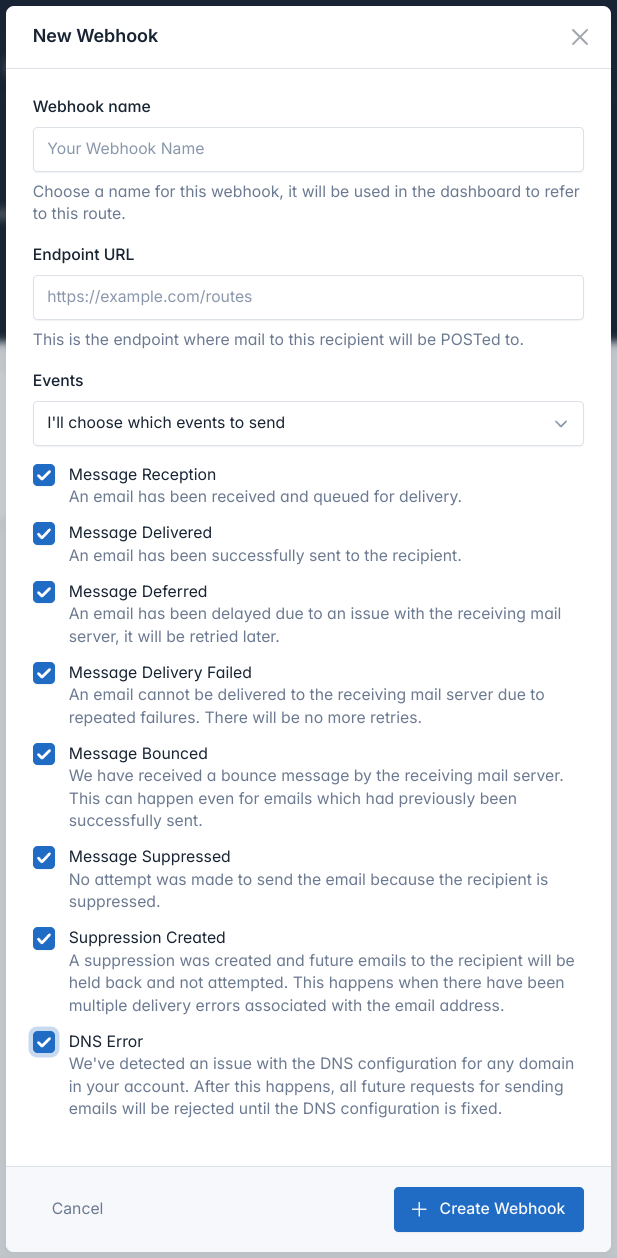 Configure webhooks in your AhaSend dashboard to start receiving event notifications:
1. **Log in** to your [AhaSend Dashboard](https://dash.ahasend.com)
2. **Navigate** to the **[Webhooks](https://dash.ahasend.com/account/-/integrations/webhooks)** section from the main menu
3. **Click** the **"Add Webhook"** button
**Enter Your Endpoint URL:**
* Provide the complete URL where you want to receive webhook events
* Must be a valid HTTPS URL (HTTP allowed for development)
* Should respond with 2xx status codes for successful processing
**Example URLs:**
```
https://api.yourapp.com/webhooks/ahasend
https://yourapp.com/api/email-events
```
Choose which events to receive:
**Option 1: All Events**
* Select "Send all events to this endpoint URL"
* Simplest option, receives every event type
* Good for comprehensive logging or analytics
**Option 2: Specific Events**
* Select "I'll choose which events to send"
* Pick individual event types you need
* More efficient for targeted use cases
1. **Click** "Create Webhook" to save your configuration
2. **Note the Webhook Secret** displayed on the details page
3. **Copy and store** the secret securely for signature verification
## Testing Your Webhooks
Verify your webhook integration works correctly before going live:
1. **Go to** your webhook details page in the dashboard
2. **Click** "Send Test Event"
3. **Select** which event types to test
4. **Click** "Send Test Events"
Test events arrive within seconds and contain realistic sample data.
**For Quick Testing:**
* Use [Beeceptor](https://beeceptor.com) to create temporary webhook URLs
* Inspect incoming requests and verify payload structure
* Test without writing code first
**For Development:**
* Use [ngrok](https://ngrok.com) to expose local development servers
* Test webhook handling in your actual application code
Ensure your endpoint:
* **Returns 2xx status codes** for successful processing
* **Processes requests quickly** (under 10 seconds)
* **Handles duplicate events** gracefully using webhook-id
* **Validates webhook signatures** for security
**Timeout Considerations:** Webhook requests timeout after 10 seconds. Perform heavy processing asynchronously.
## Security and Verification
AhaSend follows the [Standard Webhooks specification](https://github.com/standard-webhooks/standard-webhooks) for secure webhook delivery:
### Security Headers
Every webhook request includes security headers:
```http theme={null}
webhook-id: wh_1234567890abcdef
webhook-timestamp: 1683360000
webhook-signature: v1,g0hM9SsE+OTPJTGt/tmIKtSyZlE3uFJELVlNIOLJ1OE=
```
**Unique event identifier** - Use as an idempotency key to prevent processing duplicate events from retries.
**Unix timestamp** when the webhook was sent - Use to reject old webhook attempts.
**HMAC signature** of the payload using your webhook secret - Verify this to ensure authenticity.
### Signature Verification
Use Standard Webhooks libraries for easy verification:
```javascript Node.js theme={null}
import { Webhook } from 'standardwebhooks';
const webhook = new Webhook(process.env.WEBHOOK_SECRET, { format: 'raw' });
// In your webhook handler
export async function handleWebhook(request) {
const payload = await request.text();
const headers = {
'webhook-id': request.headers.get('webhook-id'),
'webhook-timestamp': request.headers.get('webhook-timestamp'),
'webhook-signature': request.headers.get('webhook-signature')
};
try {
const event = webhook.verify(payload, headers);
// Process verified event
console.log('Event:', event.type, event.data);
return new Response('OK', { status: 200 });
} catch (error) {
return new Response('Invalid signature', { status: 400 });
}
}
```
```python Python theme={null}
from standardwebhooks.webhooks import Webhook
import os
webhook = Webhook(os.environ['WEBHOOK_SECRET'])
def handle_webhook(request):
headers = {
'webhook-id': request.headers.get('webhook-id'),
'webhook-timestamp': request.headers.get('webhook-timestamp'),
'webhook-signature': request.headers.get('webhook-signature')
}
try:
payload = request.body
event = webhook.verify(payload, headers)
# Process verified event
print(f"Event: {event['type']}, Data: {event['data']}")
return {'status': 'success'}, 200
except Exception as e:
return {'error': 'Invalid signature'}, 400
```
```go Go theme={null}
package main
import (
"io"
"log"
"net/http"
"os"
standardwebhooks "github.com/standard-webhooks/standard-webhooks/libraries/go"
)
func handleWebhook(w http.ResponseWriter, r *http.Request) {
webhook, err := standardwebhooks.NewWebhookRaw(os.Getenv("WEBHOOK_SECRET"))
if err != nil {
http.Error(w, "Invalid webhook secret", 500)
return
}
payload, _ := io.ReadAll(r.Body)
headers := r.Header
if err := webhook.Verify(payload, headers); err != nil {
http.Error(w, "Invalid signature", 400)
return
}
// Process verified event
log.Printf("Verified webhook received")
w.WriteHeader(200)
}
```
```php PHP theme={null}
getBody();
$headers = $request->getHeaders();
try {
$event = $webhook->verify($payload, $headers);
// Process verified event
error_log("Event: " . $event['type']);
return response('OK', 200);
} catch (Exception $e) {
return response('Invalid signature', 400);
}
}
?>
```
**Standard Webhooks Libraries:** AhaSend webhooks are fully compatible with [Standard Webhooks libraries](https://github.com/standard-webhooks/standard-webhooks) available for Python, JavaScript, Go, PHP, Ruby, Java, Rust, C#, and Elixir.
## Webhook Payload Structure
**Complete Payload Documentation:** For detailed event schemas and all payload fields, see the [Webhook Events API Reference](/api-reference/webhooks).
All AhaSend webhooks follow the Standard Webhooks payload format:
```json theme={null}
{
"type": "event.type",
"timestamp": "2024-05-06T09:49:16.687031577Z",
"data": {
// Event-specific data
}
}
```
### Message Event Example
```json theme={null}
{
"type": "message.delivered",
"timestamp": "2024-05-06T09:50:16.687031577Z",
"data": {
"account_id": "4cdd7bdd-294e-4762-892f-83d40abf5a87",
"event": "on_delivered",
"from": "hello@yourcompany.com",
"recipient": "customer@example.com",
"subject": "Welcome to our service",
"message_id_header": "message-id-12345",
"id": "ahasend-message-67890"
}
}
```
### Suppression Event Example
```json theme={null}
{
"type": "suppression.created",
"timestamp": "2024-05-06T12:57:06.451529527Z",
"data": {
"account_id": "4cdd7bdd-294e-4762-892f-83d40abf5a87",
"recipient": "bounced@example.com",
"created_at": "2024-05-06T12:57:06.451529617Z",
"expires_at": "2024-06-05T12:57:06.451529617Z",
"reason": "Too many hard bounces",
"sending_domain": "yourcompany.com"
}
}
```
## Best Practices
**Handle Retries Gracefully:**
* Use `webhook-id` as an idempotency key to prevent duplicate processing
* Store processed webhook IDs to detect and skip duplicates
* Return 2xx status codes quickly (under 10 seconds)
**Process Asynchronously:**
* Acknowledge receipt immediately with 200 OK
* Queue heavy processing for background workers
* Avoid database operations that could timeout
**Monitor Your Endpoints:**
* Log webhook processing times and errors
* Set up alerts for failing webhooks
* Track webhook-related application metrics
**Always Verify Signatures:**
* Use Standard Webhooks libraries for verification
* Reject requests with invalid or missing signatures
* Check timestamp to prevent replay attacks
**Secure Your Endpoints:**
* Use HTTPS URLs for production webhooks
* Don't expose webhook URLs publicly
* Consider IP whitelisting if needed
**Protect Webhook Secrets:**
* Store webhook secrets in environment variables
* Never commit secrets to version control
* Rotate secrets periodically
**Graceful Failure Handling:**
* Return appropriate HTTP status codes
* Log webhook processing errors for debugging
* Implement circuit breakers for external dependencies
**Event Processing Logic:**
* Handle unexpected event types gracefully
* Validate event data before processing
* Don't assume all fields will always be present
**Testing and Monitoring:**
* Test webhook handlers with various event types
* Monitor webhook delivery success rates in dashboard
* Set up alerts for consecutive webhook failures
## Troubleshooting
**Check Your Configuration:**
* Verify webhook URL is correct and accessible
* Ensure your server returns 2xx status codes
* Check firewall settings aren't blocking AhaSend IPs
**Test Your Endpoint:**
* Use "Send Test Event" feature in dashboard
* Test with tools like curl or Postman
* Verify your endpoint handles POST requests
**Review Dashboard Logs:**
* Check webhook delivery attempts in your dashboard
* Look for error messages and status codes
* Monitor retry attempts and failure patterns
**Signature Verification Issues:**
* Ensure webhook secret is correctly configured
* Use raw request body for signature calculation
* Check Standard Webhooks library implementation
**Common Mistakes:**
* Using wrong webhook secret
* Modifying request body before verification
* Incorrect header name extraction
**Debug Steps:**
* Log incoming headers and payload
* Verify webhook secret matches dashboard
* Test with Standard Webhooks library examples
**Timeout Problems:**
* Reduce processing time in webhook handler
* Move heavy operations to background jobs
* Return 200 OK before processing starts
**High Volume Handling:**
* Implement proper queuing systems
* Scale webhook processing horizontally
* Monitor resource usage during peak times
**Optimization Tips:**
* Cache frequently accessed data
* Use database connection pooling
* Implement proper logging levels
**Automatic Disabling:**
* AhaSend disables webhooks after 100 consecutive failures
* You'll receive an email notification when this happens
* Fix underlying issues before re-enabling
**Re-enabling Process:**
* Identify and resolve the root cause
* Test your endpoint is working correctly
* Re-enable the webhook in your dashboard
**Prevention:**
* Monitor webhook success rates regularly
* Set up alerts for webhook failures
* Implement proper error handling and logging
## Advanced Integration Patterns
Use webhooks to trigger microservices, update user interfaces, and orchestrate complex workflows based on email events.
Stream webhook events to analytics platforms for real-time email performance dashboards and reporting.
Automatically create support tickets from bounce events and delivery failures to keep your team informed.
Trigger marketing campaigns, update customer segments, and personalize user experiences based on email engagement.
## Related Documentation
Complete API documentation for webhook management
Detailed security implementation and best practices
Understanding webhook delivery and retry behavior
Configure webhooks in your AhaSend dashboard to start receiving event notifications:
1. **Log in** to your [AhaSend Dashboard](https://dash.ahasend.com)
2. **Navigate** to the **[Webhooks](https://dash.ahasend.com/account/-/integrations/webhooks)** section from the main menu
3. **Click** the **"Add Webhook"** button
**Enter Your Endpoint URL:**
* Provide the complete URL where you want to receive webhook events
* Must be a valid HTTPS URL (HTTP allowed for development)
* Should respond with 2xx status codes for successful processing
**Example URLs:**
```
https://api.yourapp.com/webhooks/ahasend
https://yourapp.com/api/email-events
```
Choose which events to receive:
**Option 1: All Events**
* Select "Send all events to this endpoint URL"
* Simplest option, receives every event type
* Good for comprehensive logging or analytics
**Option 2: Specific Events**
* Select "I'll choose which events to send"
* Pick individual event types you need
* More efficient for targeted use cases
1. **Click** "Create Webhook" to save your configuration
2. **Note the Webhook Secret** displayed on the details page
3. **Copy and store** the secret securely for signature verification
## Testing Your Webhooks
Verify your webhook integration works correctly before going live:
1. **Go to** your webhook details page in the dashboard
2. **Click** "Send Test Event"
3. **Select** which event types to test
4. **Click** "Send Test Events"
Test events arrive within seconds and contain realistic sample data.
**For Quick Testing:**
* Use [Beeceptor](https://beeceptor.com) to create temporary webhook URLs
* Inspect incoming requests and verify payload structure
* Test without writing code first
**For Development:**
* Use [ngrok](https://ngrok.com) to expose local development servers
* Test webhook handling in your actual application code
Ensure your endpoint:
* **Returns 2xx status codes** for successful processing
* **Processes requests quickly** (under 10 seconds)
* **Handles duplicate events** gracefully using webhook-id
* **Validates webhook signatures** for security
**Timeout Considerations:** Webhook requests timeout after 10 seconds. Perform heavy processing asynchronously.
## Security and Verification
AhaSend follows the [Standard Webhooks specification](https://github.com/standard-webhooks/standard-webhooks) for secure webhook delivery:
### Security Headers
Every webhook request includes security headers:
```http theme={null}
webhook-id: wh_1234567890abcdef
webhook-timestamp: 1683360000
webhook-signature: v1,g0hM9SsE+OTPJTGt/tmIKtSyZlE3uFJELVlNIOLJ1OE=
```
**Unique event identifier** - Use as an idempotency key to prevent processing duplicate events from retries.
**Unix timestamp** when the webhook was sent - Use to reject old webhook attempts.
**HMAC signature** of the payload using your webhook secret - Verify this to ensure authenticity.
### Signature Verification
Use Standard Webhooks libraries for easy verification:
```javascript Node.js theme={null}
import { Webhook } from 'standardwebhooks';
const webhook = new Webhook(process.env.WEBHOOK_SECRET, { format: 'raw' });
// In your webhook handler
export async function handleWebhook(request) {
const payload = await request.text();
const headers = {
'webhook-id': request.headers.get('webhook-id'),
'webhook-timestamp': request.headers.get('webhook-timestamp'),
'webhook-signature': request.headers.get('webhook-signature')
};
try {
const event = webhook.verify(payload, headers);
// Process verified event
console.log('Event:', event.type, event.data);
return new Response('OK', { status: 200 });
} catch (error) {
return new Response('Invalid signature', { status: 400 });
}
}
```
```python Python theme={null}
from standardwebhooks.webhooks import Webhook
import os
webhook = Webhook(os.environ['WEBHOOK_SECRET'])
def handle_webhook(request):
headers = {
'webhook-id': request.headers.get('webhook-id'),
'webhook-timestamp': request.headers.get('webhook-timestamp'),
'webhook-signature': request.headers.get('webhook-signature')
}
try:
payload = request.body
event = webhook.verify(payload, headers)
# Process verified event
print(f"Event: {event['type']}, Data: {event['data']}")
return {'status': 'success'}, 200
except Exception as e:
return {'error': 'Invalid signature'}, 400
```
```go Go theme={null}
package main
import (
"io"
"log"
"net/http"
"os"
standardwebhooks "github.com/standard-webhooks/standard-webhooks/libraries/go"
)
func handleWebhook(w http.ResponseWriter, r *http.Request) {
webhook, err := standardwebhooks.NewWebhookRaw(os.Getenv("WEBHOOK_SECRET"))
if err != nil {
http.Error(w, "Invalid webhook secret", 500)
return
}
payload, _ := io.ReadAll(r.Body)
headers := r.Header
if err := webhook.Verify(payload, headers); err != nil {
http.Error(w, "Invalid signature", 400)
return
}
// Process verified event
log.Printf("Verified webhook received")
w.WriteHeader(200)
}
```
```php PHP theme={null}
getBody();
$headers = $request->getHeaders();
try {
$event = $webhook->verify($payload, $headers);
// Process verified event
error_log("Event: " . $event['type']);
return response('OK', 200);
} catch (Exception $e) {
return response('Invalid signature', 400);
}
}
?>
```
**Standard Webhooks Libraries:** AhaSend webhooks are fully compatible with [Standard Webhooks libraries](https://github.com/standard-webhooks/standard-webhooks) available for Python, JavaScript, Go, PHP, Ruby, Java, Rust, C#, and Elixir.
## Webhook Payload Structure
**Complete Payload Documentation:** For detailed event schemas and all payload fields, see the [Webhook Events API Reference](/api-reference/webhooks).
All AhaSend webhooks follow the Standard Webhooks payload format:
```json theme={null}
{
"type": "event.type",
"timestamp": "2024-05-06T09:49:16.687031577Z",
"data": {
// Event-specific data
}
}
```
### Message Event Example
```json theme={null}
{
"type": "message.delivered",
"timestamp": "2024-05-06T09:50:16.687031577Z",
"data": {
"account_id": "4cdd7bdd-294e-4762-892f-83d40abf5a87",
"event": "on_delivered",
"from": "hello@yourcompany.com",
"recipient": "customer@example.com",
"subject": "Welcome to our service",
"message_id_header": "message-id-12345",
"id": "ahasend-message-67890"
}
}
```
### Suppression Event Example
```json theme={null}
{
"type": "suppression.created",
"timestamp": "2024-05-06T12:57:06.451529527Z",
"data": {
"account_id": "4cdd7bdd-294e-4762-892f-83d40abf5a87",
"recipient": "bounced@example.com",
"created_at": "2024-05-06T12:57:06.451529617Z",
"expires_at": "2024-06-05T12:57:06.451529617Z",
"reason": "Too many hard bounces",
"sending_domain": "yourcompany.com"
}
}
```
## Best Practices
**Handle Retries Gracefully:**
* Use `webhook-id` as an idempotency key to prevent duplicate processing
* Store processed webhook IDs to detect and skip duplicates
* Return 2xx status codes quickly (under 10 seconds)
**Process Asynchronously:**
* Acknowledge receipt immediately with 200 OK
* Queue heavy processing for background workers
* Avoid database operations that could timeout
**Monitor Your Endpoints:**
* Log webhook processing times and errors
* Set up alerts for failing webhooks
* Track webhook-related application metrics
**Always Verify Signatures:**
* Use Standard Webhooks libraries for verification
* Reject requests with invalid or missing signatures
* Check timestamp to prevent replay attacks
**Secure Your Endpoints:**
* Use HTTPS URLs for production webhooks
* Don't expose webhook URLs publicly
* Consider IP whitelisting if needed
**Protect Webhook Secrets:**
* Store webhook secrets in environment variables
* Never commit secrets to version control
* Rotate secrets periodically
**Graceful Failure Handling:**
* Return appropriate HTTP status codes
* Log webhook processing errors for debugging
* Implement circuit breakers for external dependencies
**Event Processing Logic:**
* Handle unexpected event types gracefully
* Validate event data before processing
* Don't assume all fields will always be present
**Testing and Monitoring:**
* Test webhook handlers with various event types
* Monitor webhook delivery success rates in dashboard
* Set up alerts for consecutive webhook failures
## Troubleshooting
**Check Your Configuration:**
* Verify webhook URL is correct and accessible
* Ensure your server returns 2xx status codes
* Check firewall settings aren't blocking AhaSend IPs
**Test Your Endpoint:**
* Use "Send Test Event" feature in dashboard
* Test with tools like curl or Postman
* Verify your endpoint handles POST requests
**Review Dashboard Logs:**
* Check webhook delivery attempts in your dashboard
* Look for error messages and status codes
* Monitor retry attempts and failure patterns
**Signature Verification Issues:**
* Ensure webhook secret is correctly configured
* Use raw request body for signature calculation
* Check Standard Webhooks library implementation
**Common Mistakes:**
* Using wrong webhook secret
* Modifying request body before verification
* Incorrect header name extraction
**Debug Steps:**
* Log incoming headers and payload
* Verify webhook secret matches dashboard
* Test with Standard Webhooks library examples
**Timeout Problems:**
* Reduce processing time in webhook handler
* Move heavy operations to background jobs
* Return 200 OK before processing starts
**High Volume Handling:**
* Implement proper queuing systems
* Scale webhook processing horizontally
* Monitor resource usage during peak times
**Optimization Tips:**
* Cache frequently accessed data
* Use database connection pooling
* Implement proper logging levels
**Automatic Disabling:**
* AhaSend disables webhooks after 100 consecutive failures
* You'll receive an email notification when this happens
* Fix underlying issues before re-enabling
**Re-enabling Process:**
* Identify and resolve the root cause
* Test your endpoint is working correctly
* Re-enable the webhook in your dashboard
**Prevention:**
* Monitor webhook success rates regularly
* Set up alerts for webhook failures
* Implement proper error handling and logging
## Advanced Integration Patterns
Use webhooks to trigger microservices, update user interfaces, and orchestrate complex workflows based on email events.
Stream webhook events to analytics platforms for real-time email performance dashboards and reporting.
Automatically create support tickets from bounce events and delivery failures to keep your team informed.
Trigger marketing campaigns, update customer segments, and personalize user experiences based on email engagement.
## Related Documentation
Complete API documentation for webhook management
Detailed security implementation and best practices
Understanding webhook delivery and retry behavior