> ## Documentation Index
> Fetch the complete documentation index at: https://ahasend.com/docs/llms.txt
> Use this file to discover all available pages before exploring further.
# Scoped API Keys
> Control API access with domain restrictions and granular permissions for enhanced security
Control your API access with scoped credentials that restrict usage to specific domains and operations. AhaSend offers two types of scoped credentials, each with different capabilities and use cases.
**Enhanced Security:** Scoped credentials reduce attack surface by limiting potential damage if a credential is compromised.
## Types of Scoped Credentials
AhaSend provides two distinct credential types with different scoping capabilities:
**SMTP & API v1/v2 sending keys**
Domain-scoped credentials for email sending operations only
**Full API access keys**
Advanced scoping with both domain restrictions and operation permissions
***
## Sending Credentials (Domain Scoping)
Sending credentials are created from the **[Credentials](https://dash.ahasend.com/account/-/transactional/credentials)** tab and are designed specifically for email sending operations. These include SMTP credentials, API v1 keys, and API v2 sending keys.
### Global vs. Scoped Sending Credentials
**Global Credentials (Default):**
* **Access:** Can send from any verified domain in your account
* **Use case:** General-purpose credentials for multi-domain applications
* **Risk:** Higher impact if compromised
**Domain-Scoped Credentials:**
* **Access:** Limited to specific domains you select
* **Use case:** Application-specific credentials or domain isolation
* **Risk:** Limited damage potential if compromised
**Principle of Least Privilege:** Always scope credentials to the minimum domains required for your use case.
### Creating Scoped Sending Credentials
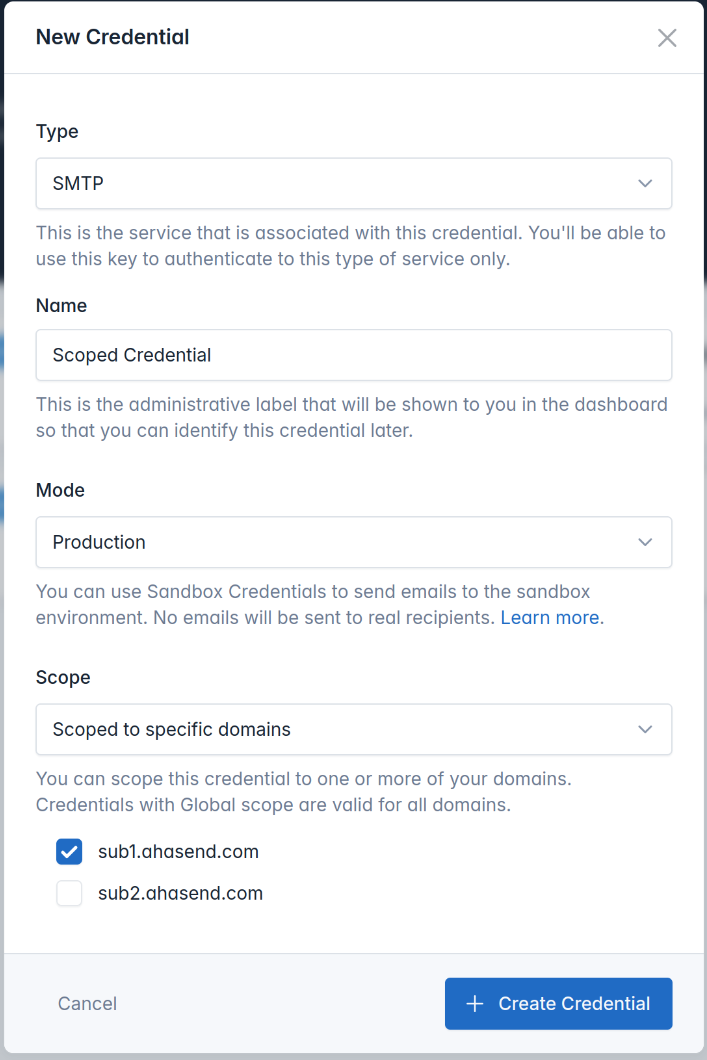 **Navigate to sending credentials:**
1. **Log in** to your AhaSend dashboard
2. **Click** **[Credentials](https://dash.ahasend.com/account/-/transactional/credentials)** in the main menu
3. **Click** **+ Add Credential** button
**Set up credential information:**
* **Type:** Choose SMTP, API v1, or API v2
* **Name:** Enter a descriptive name
* **Mode:** Select Production or Sandbox
**Restrict to specific sending domains:**
**Global Access:**
* Leave **Scope** set to "Global" (default)
* Allows sending from any verified domain
**Domain-Specific Access:**
1. **Select** "Scope to specific domains"
2. **Click** checkboxes for authorized domains
3. **Choose** one or multiple domains as needed
**Generate your scoped credential:**
1. **Click** "Create Credential"
2. **Copy** the generated credentials immediately
3. **Store** securely in your application
**Propagation Time:** Changes to sending credentials can take up to 1 minute to propagate across all servers.
***
## API v2 Keys (Advanced Scoping)
API v2 keys are created from **Account Settings** → **[API Keys](https://dash.ahasend.com/account/-/settings/api-keys)** and provide full access to the AhaSend API v2 with granular permission and domain scoping.
### Advanced Scoping Capabilities
API v2 keys support both domain restrictions and operation-level permissions:
**Domain Scoping:**
* Restrict API operations to specific domains
* Control which domains the key can manage or send from
**Permission Scoping:**
* Granular control over API operations (read, write, delete)
* Resource-specific access (messages, domains, webhooks, statistics)
* Hierarchical permission inheritance
### Creating API v2 Keys
**Navigate to API key management:**
1. **Log in** to your AhaSend dashboard
2. **Go to** **Account Settings**
3. **Click** **[API Keys](https://dash.ahasend.com/account/-/settings/api-keys)** in the sidebar
4. **Click** **+ Create API Key** button
**Set up API key details:**
* **Name:** Enter a descriptive name
* **Description:** Optional description of the key's purpose
**Define what operations the key can perform:**
Configure specific API operation permissions based on your requirements. Common scope categories include:
* **Account Management:** `accounts:read`, `accounts:write`
* **Message Operations:** `messages:send:all`, `messages:read:{domain}`
* **Domain Management:** `domains:read`, `domains:write`
* **Webhook Control:** `webhooks:write:all`, `webhooks:delete:{domain}`
**Detailed Scoping:** See our [complete API scopes reference](/api-reference/scopes) for all available permissions and syntax.
**Optionally limit to specific domains:**
You can further restrict the API key to operate only on specific domains within your account, providing an additional layer of security.
**Generate your API v2 key:**
1. **Review** the configured scopes and restrictions
2. **Click** "Create API Key"
3. **Copy** the generated key immediately
4. **Store** securely in your application
### How Sending Credential Scoping Works
When you use a domain-scoped sending credential, AhaSend validates the sending domain:
**SMTP Credentials:**
* **Validates:** `MAIL FROM` address domain
* **Checks:** Domain is in the credential's authorized list
* **Action:** Refuses connection if unauthorized
**API v1/v2 Sending:**
* **Validates:** `from.email` domain in request payload
* **Checks:** Domain scope against the API key
* **Action:** Rejects request if domain is not authorized
### Sending Credential Error Messages
When using credentials outside their domain scope:
**SMTP Connection Rejected:**
```plaintext theme={null}
authz_id 'YOUR_USERNAME' is not authorized to send as tenant 'YOUR_ACCOUNT_ID' or from this domain
```
**API v1 Request Error:**
```json theme={null}
{
"status": "API Key is not scoped for this domain"
}
```
**API v2 Request Error:**
```json theme={null}
{
"message": "this api key is not authorized to send messages from the domain 'example.com'"
}
```
### API v2 Key Validation
API v2 keys undergo comprehensive validation for each request:
**Permission Validation:**
* **Operation Check:** Verifies the key has permission for the requested operation
* **Resource Access:** Ensures access to specific resources (domains, webhooks, etc.)
* **Hierarchy Enforcement:** Respects scope hierarchy and inheritance rules
**Domain Validation:**
* **Resource Domain:** Checks if the key can access resources for the specified domain
* **Sending Domain:** Validates sending permissions for message operations
### API v2 Key Error Messages
When using API v2 keys outside their defined scope:
**Insufficient Permissions:**
```json theme={null}
{
"error": "Insufficient permissions",
"message": "API key lacks required scope: messages:send:all"
}
```
**Resource Access Denied:**
```json theme={null}
{
"error": "Access denied",
"message": "API key not authorized for this resource"
}
```
**Domain Not Authorized:**
```json theme={null}
{
"message": "this api key is not authorized to send messages from the domain 'example.com'"
}
```
### Advanced Permission Scoping
For granular control over API operations, API v2 keys support detailed permission scopes:
#### Common Scope Categories
* **Account Management:** `accounts:read`, `accounts:write`
* **Message Operations:** `messages:send:all`, `messages:read:{domain}`
* **Domain Management:** `domains:read`, `domains:write`
* **Webhook Control:** `webhooks:write:all`, `webhooks:delete:{domain}`
* **Statistics Access:** `statistics-transactional:read:all`
#### Scope Types
* **Static Scopes:** Fixed permissions like `accounts:read`
* **Global Scopes:** Domain-wide access with `:all` suffix
* **Domain-Specific:** Restricted to particular domains using `{domain}` syntax
**Detailed Documentation:** For complete scope definitions, validation rules, and examples, see our [API Scopes Reference](/api-reference/scopes).
## Benefits and Best Practices
Scoped credentials provide significant advantages regardless of type:
### Security Benefits
**Minimize compromise impact:**
* Limit potential damage from stolen credentials
* Reduce attack surface with principle of least privilege
* Prevent unauthorized access to sensitive domains
**Granular access management:**
* Separate credentials for different applications
* Team-specific permissions and domain access
* Environment-specific scoping (staging vs. production)
**Prevent configuration mistakes:**
* Block accidental sending from wrong domains
* Catch misconfigurations early in development
* Protect production domains from test applications
**Simplified credential administration:**
* Clear understanding of credential capabilities
* Easy revocation of specific domain access
* Organized credential structure for complex setups
### Implementation Best Practices
**Design your scoping approach:**
* **Application-specific keys:** One key per application or service
* **Environment separation:** Different keys for staging, production
* **Domain isolation:** Separate keys for different business domains
* **Minimal permissions:** Grant only necessary scopes
**Maintain credential security:**
* Regular audit of active credentials and their scopes
* Rotate credentials periodically
* Remove unused or outdated credentials
* Monitor for scope violation errors in logs
**Integrate scoping into development:**
* Use scoped credentials in development environments
* Test scope restrictions before production deployment
* Document credential requirements for each application
* Implement proper error handling for scope violations
## Common Use Cases
**Customer domain isolation**
Create domain-scoped credentials for each customer's subdomain, preventing cross-customer access
**Service-specific credentials**
Each microservice gets credentials scoped to its required domains and operations
**Purpose-based separation**
Separate credentials for marketing emails vs. transactional notifications
**External service limitations**
Provide limited-scope credentials to external services and partners
## Related Documentation
Complete guide to permission scopes and validation rules
API authentication methods and best practices
Creating and managing SMTP sending credentials
**Navigate to sending credentials:**
1. **Log in** to your AhaSend dashboard
2. **Click** **[Credentials](https://dash.ahasend.com/account/-/transactional/credentials)** in the main menu
3. **Click** **+ Add Credential** button
**Set up credential information:**
* **Type:** Choose SMTP, API v1, or API v2
* **Name:** Enter a descriptive name
* **Mode:** Select Production or Sandbox
**Restrict to specific sending domains:**
**Global Access:**
* Leave **Scope** set to "Global" (default)
* Allows sending from any verified domain
**Domain-Specific Access:**
1. **Select** "Scope to specific domains"
2. **Click** checkboxes for authorized domains
3. **Choose** one or multiple domains as needed
**Generate your scoped credential:**
1. **Click** "Create Credential"
2. **Copy** the generated credentials immediately
3. **Store** securely in your application
**Propagation Time:** Changes to sending credentials can take up to 1 minute to propagate across all servers.
***
## API v2 Keys (Advanced Scoping)
API v2 keys are created from **Account Settings** → **[API Keys](https://dash.ahasend.com/account/-/settings/api-keys)** and provide full access to the AhaSend API v2 with granular permission and domain scoping.
### Advanced Scoping Capabilities
API v2 keys support both domain restrictions and operation-level permissions:
**Domain Scoping:**
* Restrict API operations to specific domains
* Control which domains the key can manage or send from
**Permission Scoping:**
* Granular control over API operations (read, write, delete)
* Resource-specific access (messages, domains, webhooks, statistics)
* Hierarchical permission inheritance
### Creating API v2 Keys
**Navigate to API key management:**
1. **Log in** to your AhaSend dashboard
2. **Go to** **Account Settings**
3. **Click** **[API Keys](https://dash.ahasend.com/account/-/settings/api-keys)** in the sidebar
4. **Click** **+ Create API Key** button
**Set up API key details:**
* **Name:** Enter a descriptive name
* **Description:** Optional description of the key's purpose
**Define what operations the key can perform:**
Configure specific API operation permissions based on your requirements. Common scope categories include:
* **Account Management:** `accounts:read`, `accounts:write`
* **Message Operations:** `messages:send:all`, `messages:read:{domain}`
* **Domain Management:** `domains:read`, `domains:write`
* **Webhook Control:** `webhooks:write:all`, `webhooks:delete:{domain}`
**Detailed Scoping:** See our [complete API scopes reference](/api-reference/scopes) for all available permissions and syntax.
**Optionally limit to specific domains:**
You can further restrict the API key to operate only on specific domains within your account, providing an additional layer of security.
**Generate your API v2 key:**
1. **Review** the configured scopes and restrictions
2. **Click** "Create API Key"
3. **Copy** the generated key immediately
4. **Store** securely in your application
### How Sending Credential Scoping Works
When you use a domain-scoped sending credential, AhaSend validates the sending domain:
**SMTP Credentials:**
* **Validates:** `MAIL FROM` address domain
* **Checks:** Domain is in the credential's authorized list
* **Action:** Refuses connection if unauthorized
**API v1/v2 Sending:**
* **Validates:** `from.email` domain in request payload
* **Checks:** Domain scope against the API key
* **Action:** Rejects request if domain is not authorized
### Sending Credential Error Messages
When using credentials outside their domain scope:
**SMTP Connection Rejected:**
```plaintext theme={null}
authz_id 'YOUR_USERNAME' is not authorized to send as tenant 'YOUR_ACCOUNT_ID' or from this domain
```
**API v1 Request Error:**
```json theme={null}
{
"status": "API Key is not scoped for this domain"
}
```
**API v2 Request Error:**
```json theme={null}
{
"message": "this api key is not authorized to send messages from the domain 'example.com'"
}
```
### API v2 Key Validation
API v2 keys undergo comprehensive validation for each request:
**Permission Validation:**
* **Operation Check:** Verifies the key has permission for the requested operation
* **Resource Access:** Ensures access to specific resources (domains, webhooks, etc.)
* **Hierarchy Enforcement:** Respects scope hierarchy and inheritance rules
**Domain Validation:**
* **Resource Domain:** Checks if the key can access resources for the specified domain
* **Sending Domain:** Validates sending permissions for message operations
### API v2 Key Error Messages
When using API v2 keys outside their defined scope:
**Insufficient Permissions:**
```json theme={null}
{
"error": "Insufficient permissions",
"message": "API key lacks required scope: messages:send:all"
}
```
**Resource Access Denied:**
```json theme={null}
{
"error": "Access denied",
"message": "API key not authorized for this resource"
}
```
**Domain Not Authorized:**
```json theme={null}
{
"message": "this api key is not authorized to send messages from the domain 'example.com'"
}
```
### Advanced Permission Scoping
For granular control over API operations, API v2 keys support detailed permission scopes:
#### Common Scope Categories
* **Account Management:** `accounts:read`, `accounts:write`
* **Message Operations:** `messages:send:all`, `messages:read:{domain}`
* **Domain Management:** `domains:read`, `domains:write`
* **Webhook Control:** `webhooks:write:all`, `webhooks:delete:{domain}`
* **Statistics Access:** `statistics-transactional:read:all`
#### Scope Types
* **Static Scopes:** Fixed permissions like `accounts:read`
* **Global Scopes:** Domain-wide access with `:all` suffix
* **Domain-Specific:** Restricted to particular domains using `{domain}` syntax
**Detailed Documentation:** For complete scope definitions, validation rules, and examples, see our [API Scopes Reference](/api-reference/scopes).
## Benefits and Best Practices
Scoped credentials provide significant advantages regardless of type:
### Security Benefits
**Minimize compromise impact:**
* Limit potential damage from stolen credentials
* Reduce attack surface with principle of least privilege
* Prevent unauthorized access to sensitive domains
**Granular access management:**
* Separate credentials for different applications
* Team-specific permissions and domain access
* Environment-specific scoping (staging vs. production)
**Prevent configuration mistakes:**
* Block accidental sending from wrong domains
* Catch misconfigurations early in development
* Protect production domains from test applications
**Simplified credential administration:**
* Clear understanding of credential capabilities
* Easy revocation of specific domain access
* Organized credential structure for complex setups
### Implementation Best Practices
**Design your scoping approach:**
* **Application-specific keys:** One key per application or service
* **Environment separation:** Different keys for staging, production
* **Domain isolation:** Separate keys for different business domains
* **Minimal permissions:** Grant only necessary scopes
**Maintain credential security:**
* Regular audit of active credentials and their scopes
* Rotate credentials periodically
* Remove unused or outdated credentials
* Monitor for scope violation errors in logs
**Integrate scoping into development:**
* Use scoped credentials in development environments
* Test scope restrictions before production deployment
* Document credential requirements for each application
* Implement proper error handling for scope violations
## Common Use Cases
**Customer domain isolation**
Create domain-scoped credentials for each customer's subdomain, preventing cross-customer access
**Service-specific credentials**
Each microservice gets credentials scoped to its required domains and operations
**Purpose-based separation**
Separate credentials for marketing emails vs. transactional notifications
**External service limitations**
Provide limited-scope credentials to external services and partners
## Related Documentation
Complete guide to permission scopes and validation rules
API authentication methods and best practices
Creating and managing SMTP sending credentials